Publish a newsletter
A newsletter is a node with 1 or 2 contents of the type Text. The first contains the message formatted in HTML. The second contains a simple text used by applications configured to display message bodies in plain text mode. Newsletters are grouped within a thread of the type Newsletter.
IMPORTANT: Set the parameter date.timezone in the configuration file of PHP php.ini to the value of the timezone of the server, i.e. Europe/Paris for a server located in France.
Without this configuration, the code may shift a scheduled publication time, typically by 2 hours during summer in France if PHP is configured to the default value of UTC.
Connect  as an administrator.
Click on the keyboard  to enter the editor.
Click on the title of thread, e.g. Content, at the top right of the banner.
Click on Threads at the top right of the banner to display the list of threads.
to enter the editor.
Click on the title of thread, e.g. Content, at the top right of the banner.
Click on Threads at the top right of the banner to display the list of threads.
Create the thread Newsletter with the type Newsletter.
Move the mouse over Newsletter in the list of threads to display the number of the thread.
Edit the file config.inc.
Assign the number of thread to the parameter $newsletter_thread.
Return to the home page.
Enter  in the Management section.
Click on the envelop  to access the thread.
Enter in the editor.
Add the node Publish a newsletter.
Edit the node.
Enter the key words iZend documentation article newsletter email in the cloud.
Add Send a newsletter formatted in HTML as an abstract.
Press Edit.
Create a first content of type Text with the following HTML:
NOTE: A thread of type Newsletter can only have contents of the type Text.
See the parameter $limited_contents in the file config.inc.
Create a second content of type Text with the following plain text:
NOTE: Tags will be automatically removed from the plain text content before including it the code of the message.
Press Modify.
Display  the node.
Check the text and the rendering of the message.
the node.
Check the text and the rendering of the message.
IMPORTANT: The message you are viewing is formatted by the CSS of the site. The message in the email is formatted by the CSS specified in the file newsletter.css which is inserted in a <style> tag in the <head> tag of the HTML of the code of the message. Edit the file newsletter.css to match the theme of the site.
Return in the editor.
Display  the version in French.
Enter the title Publier une infolettre, the cloud iZend documentation article infolettre newsletter email and Envoyez une lettre d'information éditée en HTML as an abstract.
Press Edit.
Edit the content in French of the text formatted in HTML:
Edit the content in French of the plain text:
Press Modify.
Check the text and the rendering of the message.
Enter in the Management section.
Click on the envelop to display the most recent newsletters.
Try the search engine.
Click on the newsletter Publish a newsletter.
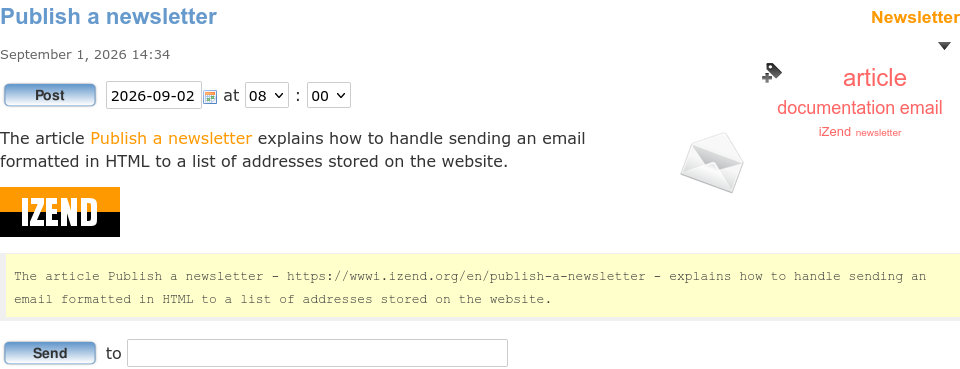
The message in plain text is displayed under the message formatted in HTML.
Testing
To test the message, enter a personal email address and press Send.
To display the message in plain text in Thunderbird: View → Message Body As → Plain Text.
To display the message in HTML: View → Message Body As → HTML original.
Press Ctrl+U to view the source code of the message. Note how the CSS is inserted into the HTML and how the images are included in the message.
Sending
To program sending the message to all the recipients of a newsletter, select a date and an hour between 08:00 and 18:00.
Press Post.
The button Post is replaced by a button Cancel.
The email addresses of the recipients are registered in the table newsletter_user in the DB.
The field locale determines in which language the message is sent.
To add an address, use the sign-up form Newsletter from the home page.
Switch to the version in French and post the message.

A newsletter is actually posted by Cron on Linux or by the Task Scheduler on Windows.
Follow the instructions in the file CRONTAB to program the regular execution of the script cron_newsletter.php in the folder cron at the root of site.
Example of a file in the folder /etc/cron.d which runs the script cron.php of the site sitename.net every 15 minutes:
*/15 * * * * www-data /usr/bin/php -f /var/www/sitename.net/cron.php
cron.php bootsraps the code a site and calls the function cron_run.
cron_run makes sure another to cron_run isn't already running and executes all the scripts *.php in the folder cron at the root of the site.
A posted newsletter displays the date and time of publication:
 The message was sent September 2, 2026 at 08:00.
The scheduled date and time of a newsletter and the date and time of its actual publication are recorded in the table newsletter_post of the DB.
Comments